
When the business policy SYSTEM_MANAGE_CAPABILITIES_ALLOWED is set to True, the CERF Admin can grant a user the capability to create a Workgroup, manage (create/edit) controlled documents, and/or manage (create/edit) controlled vocabularies. The steps are as follows:
- Set the business policy SYSTEM_MANAGE_CAPABILITIES_ALLOWED to True and save the setting.
- Log in to the CERF Desktop App as system administrator, using your system admin login credentials.
- Select the new menu item, “Manage Capabilites” from the Sessions menu.
- In the Manage Capabilities dialog select a Capability from the list of Capabilities in the left pane and select the user to whom you are granting this privilege from the drop-down list of users.
- Click on Grant Capability.
- Repeat this process to grant specific capabilities to users.
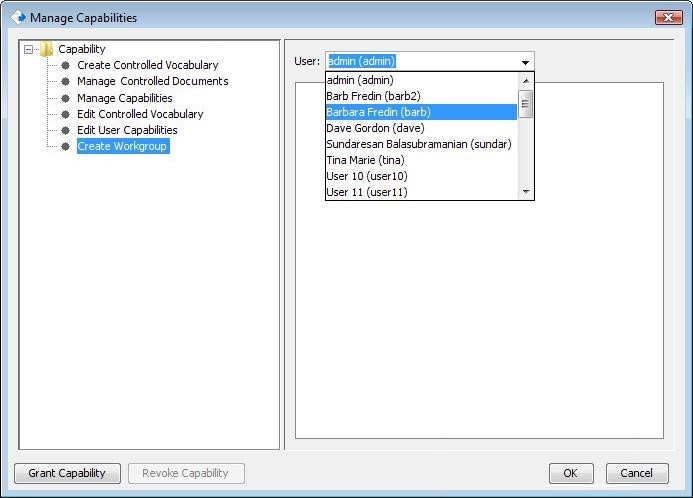
- Click OK on the Manage Capabilities dialog.
Note that you can revoke this capability by selecting the user in the Manage Capabilities dialog and clicking on Revoke. You can also give a user the capability to Edit Capabilities or Manage Capabilities. - Log out of the CERF Desktop App.
See the online User Manual for instructions for creating workgroups, managing controlled documents, and instructions for managing Controlled Vocabularies.
Sections in this Topic
< Managing Workgroups up Grant/Manage Capabilities >