
Conditions for Signing
- The person who initiates signing must be the contributor for that resource and must have a workgroup role that allows signing.
- You will not be able to sign a Notebook Page if it has multiple contributors unless the other contributors sign or finalize their own entries.*
- If you initiate signing on a Private resource, it will be changed to Shared.
- You cannot sign a resource that is currently checked out for editing.
- You will not be able to sign a Resource if it includes other Resources with pending signatures (e.g., a Notebook Page may have pending signatures for one of its Entries). It may not be immediately apparent that there are pending signatures for linked Resources. Any Resource that has a link in another context (i.e., in a different Notebook or File Cabinet) can be signed in the other context, and if the link has pending signatures, the Sign action will not be enabled on the right-click menu.
- You cannot sign a resource that contains an unfulfilled placeholder.
- You cannot sign a Finalized Page, only the entries can be Finalized. To unfinalize a Page, an administrator can log into the Web Client, locate the Page in the Notebook Resources screen, then select the “Open/Unfinalize” tab, then click the “Open/Unfinalize” button
* A less obvious way to become a contributor is by editing the metadata or content of an Entry. If a new version is created at checkin, you become the contributor for the updated Entry. The original contributor is shown for the entry and the new contributor is shown for the entry content.
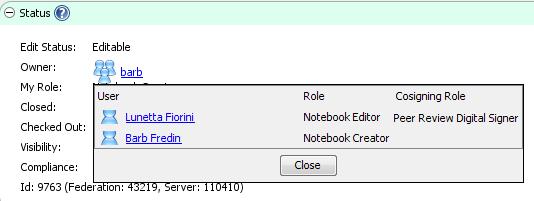
To see the list of your available cosigners prior to signing, select the Resource you want to sign in the Document Tree and look in the Info panel to the right. Click on the Owner (workgroup name) in the Status pane. If you have the correct combination of cosigner roles to meet the signature workflow requirements and if you are contributor, you will be able to sign.
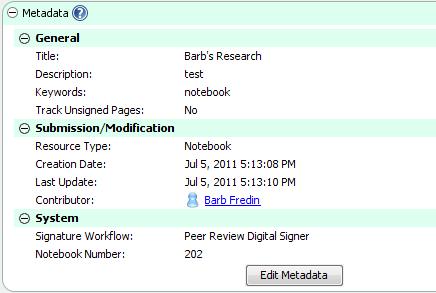
Select the Notebook in the Document Tree and look in the Info Panel to the right (Metadata pane) to see its Signature Workflow. You need to have cosigners with the cosigning roles in your workgroup that match this Signature Workflow:
Sections in this Topic
< Digital Signatures up Signature Workflow >