
You can send General Notifications about any Resource you can access. The list of possible recipients include only members of the workgroup that owns the Resource (as well as the System Administrator). When the recipients get your Notification, they can view the Resource and perform any actions allows by their access roles. To send a Notification:
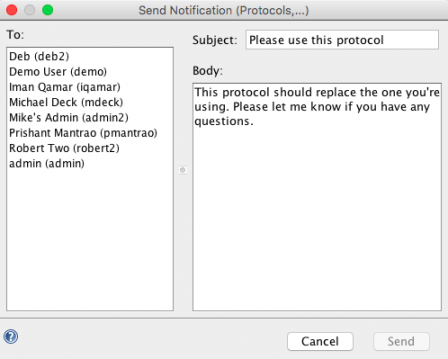
- Right-click on the Resource in the Document Tree (or right-click on the Resource if it is listed in a Version History, Annotations/Relations, Search results, etc.) and select Notifications > Send Notification from the right-click menu. (Note that you cannot send a Notification on File Cabinet or a Folder, but only on a file it contains.) This launches the Send Notification dialog.
- Users who are members of the Workgroup that owns the selected Resource are listed in the Send Notification dialog. Select all the users whom you wish to notify and type in the subject and text for the note in the right panel.
- Click Send to send the notification. If Email SMTP is configured on the server, recipients will get an email informing them that they have received a CERF notification. When they launch CERF, they can view the Notification and the resources they refer to.
< Notifications Toolbar up View Notifications >