
The search results display all the CERF resources that match your search criteria. Use Previous/Next buttons at the bottom of the Search dialog to go to a new page of results. The search is rerun on each page, and so there is a slight chance that a document submitted after the search is initiated will be missed if it has a high return score and if the user has already paged through the highest scores.
Narrow the Search
Click on the Search Parameters again to add more parameters. After you select a parameter type, expand the Search Query (circled in red in the following image) at the top of the Search Results by clicking on it. Select the parameter (in this example Version Controlled is selected from the list showing Document Edit Status).
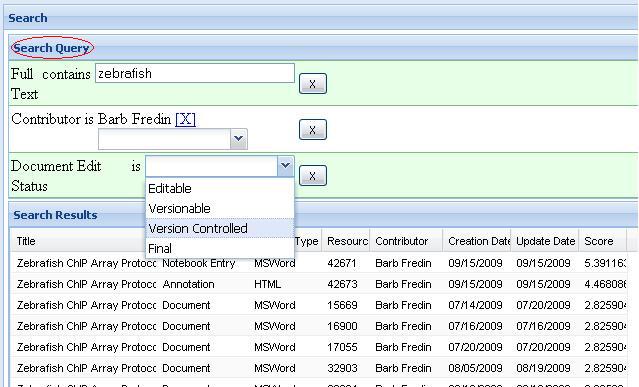
Buttons on the bottom of the Search Returns page allow you to narrow the search further by adding parameters (click on the Search button to narrow the search results), or find others in the organization who have access to resources of interest (Find Experts), or find the context in which the resource is located (Browse).
Actions on Search Results
Select a resource from the Search Results list and click on the Browse button at the bottom of the Search Results page for more options. This displays the resource in the context of a collection. See Note below * Expand the collection shown in the left panel of the “Browse for resource” page and select the resource of interest. The resource info is shown in the right panel. You can edit the title or change the Workgroup.
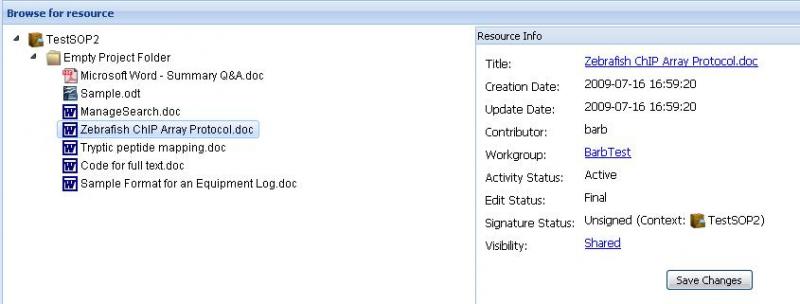
- Note that the resource must be in a collection (Notebook, Folder, Page, Entry, etc.) in order to get information about it. Some resources have multiple versions that are not associated with a collection (these can be viewed from a search in the CERF client and the user may move it to a specific collection).
- The View button at the bottom of the Browse page allows you to open the selected resource as a read-only document.
< Web Search up CERF Automaton >